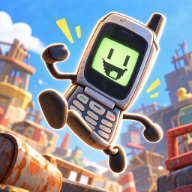
Give Flippy a Different Look
Flippy can climb the Trashlands in more than one outfit. Flipping is Hard skins are part of a customization system that includes phone covers, charms, stickers, and accessories. If you want a different look, exploration and optional challenges give you reasons to venture beyond the next upward jump.
The official Flipping Is Hard feature guide identifies three ways cosmetic rewards enter the game: hidden loot, NPC challenges, and redemption codes discovered in the world. It does not publish a complete skin catalog or assign every cosmetic to a specific source, so treat those as routes to investigate rather than a guaranteed recipe for a particular cover.
Where Cosmetic Unlocks Come From
The main climb is only part of what there is to do. When you reach a stable area, consider whether you want to continue upward or spend time exploring for customization rewards.
- Hidden loot: Look beyond the most direct climbing line. The developer explicitly includes hidden loot among the sources of cosmetics.
- NPC challenges: Optional platforming trials can reward customization items. Read a challenge's instructions before deciding whether to attempt it during your current run.
- World-found codes: The developer confirms that redemption codes can unlock cosmetics. A code's existence does not establish its current reward or whether an old demo code still works in the full release.
For a specific skin, match the reward to an actual discovery or a current in-game result. The general unlock description alone cannot tell you which NPC, hidden object, or code awards that exact item.
Opening the Phone Interface
On the keyboard, Tab opens the Phone OS. The official controls description lists skins alongside minigames, statistics, and checkpoints among the phone's features. That makes the phone interface the place to begin when you want to inspect customization during a climb.
Start with an item you already have and follow the options shown in your installed version. The official text does not specify a detailed equip sequence, an exact submenu name, or a required currency, so there is no reliable universal click-by-click sequence to give here.
It also helps to keep the cosmetic types separate when tracking discoveries. A cover changes the phone's look; charms and stickers are additional customization categories. Finding one type of item does not confirm that you have unlocked a matching set across all categories.
Building a Useful Skin Collection
Keep a short record when you receive something new: the item name shown in the game, the area, and whether it came from exploration, a challenge, or a code. That is more useful than assuming an old “all skins” video describes the release build.
If a guide says a code unlocks a particular skin, check its game version before planning a climb around it. The original demo trailer confirms that multiple skins existed, but it is not a current inventory of every release cosmetic. Use the full game's displayed unlock result to settle questions about what you actually received.
FAQ
How do you get Flipping is Hard skins?
The developer lists hidden loot, NPC challenges, and redemption codes found in the world as cosmetic unlock sources. It does not provide an item-by-item reward map on the official feature page.
Where do I find the skins interface?
Press Tab on the keyboard to open the Phone OS. The official controls page lists skins as one of its functions.
Are skins the only customization option?
No. Phone covers, charms, stickers, and accessories are all mentioned in the developer's customization description.
Do demo skin codes still work?
That needs a full-release redemption check for each code. A demo-era report alone does not establish that a code is currently redeemable or awards the same item.